
BTstack on Linux via Kernel HCI: Simplifying Bluetooth for Embedded Systems
On Linux, working with Bluetooth devices typically involves the BlueZ. The operating system detects and initializes the controller, while BlueZ acts as the central service that exposes Bluetooth functionality to applications. Although the kernel provides a uniform HCI interface for controllers connected via USB, UART, or SDIO, applications communicate with BlueZ over D-Bus and other high-level APIs to perform tasks such as device discovery, pairing, and accessing GATT services.
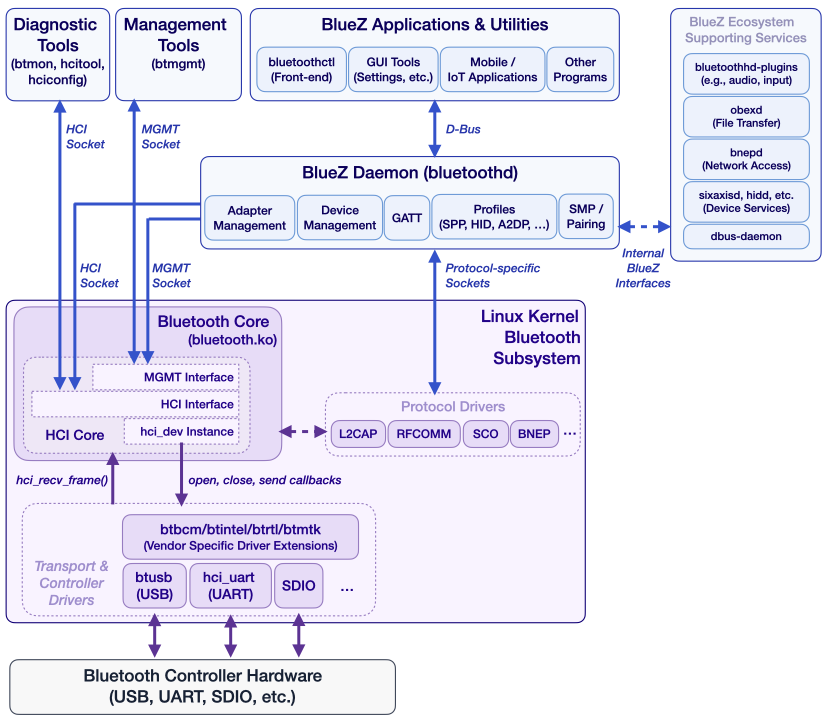
BTstack, our proprietary user-space Bluetooth Host Stack, follows a different approach: it interacts directly with Bluetooth controllers at the HCI level. For embedded Linux systems, it provides custom HCI transport implementations for UART and USB to communicate with the controller. The direct access enables BTstack to handle controller initialization, including firmware download and vendor-specific setup steps for a wide range of devices, which are often required on embedded platforms. This gives developers full control over the complete Bluetooth stack within their application.
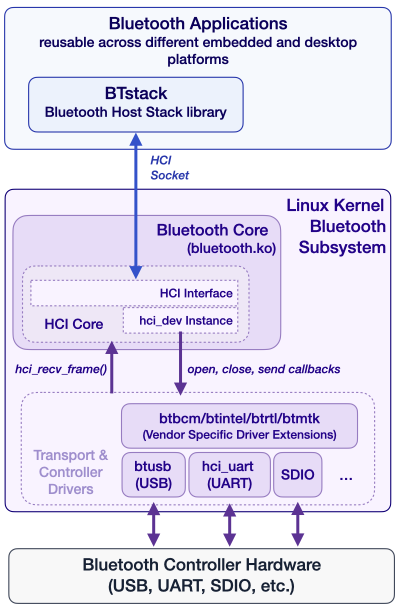
Nowadays, modern embedded designs increasingly rely on integrated Wi-Fi/Bluetooth combo chips, where the controller is managed by the kernel and not directly accessible. To support these scenarios, BTstack provides a new Linux port with HCI transport based on the Linux kernel HCI socket interface. This integration allows BTstack to better align with the Linux ecosystem while preserving its portability and clean user-space design.
In practice, a self-contained user-space stack like BTstack can significantly simplify embedded design. Instead of coordinating multiple system services, developers can implement all Bluetooth functionality within a single application, using a consistent API across platforms. By relying on the kernel’s HCI interface, hardware-specific tasks such as firmware loading or transport configuration can be delegated to the system where available. This allows developers to focus on application logic rather than system integration, while still retaining portability across embedded targets.
To illustrate this approach, we will walk through running BTstack on a popular embedded Linux platform, the Raspberry Pi 5, using the new kernel-backed HCI transport. This example demonstrates how BTstack can be used with modern, kernel-managed controllers in practice. We will also take a closer look at how BTstack compares to BlueZ, and indicate when a self-contained user-space stack could be a better fit than the standard Linux solution.
Using the Linux Kernel HCI Interface
The Linux kernel supports a wide range of Bluetooth controllers across different buses. When a controller is detected, the appropriate kernel module is loaded, the transport is initialized, and any required firmware is uploaded automatically.
Once the controller is ready, user-space applications can access it through a socket in the Bluetooth protocol family:
int hci_socket = socket(AF_BLUETOOTH, SOCK_RAW | SOCK_CLOEXEC | SOCK_NONBLOCK, BTPROTO_HCI);If successful, this socket provides direct access to HCI packets. Communication happens using the familiar H4 packet format, identical to what would be used over a UART interface. From BTstack’s perspective, this abstraction allows seamless reuse of existing logic while delegating hardware-specific complexity to the kernel.
This design cleanly separates responsibilities. The kernel handles hardware, while BTstack remains a portable, user-space Bluetooth stack.
BTstack on Raspberry Pi 5
To make this more concrete, let’s walk through running BTstack examples on a Raspberry Pi 5, which uses a combo Wi-Fi/Bluetooth chipset managed by the Linux kernel connected over SDIO (Wifi) and UART (Bluetooth).
Build Options
There are several ways to build BTstack applications for the Raspberry Pi.
A native build on the device itself is the simplest approach. It requires no additional setup and is ideal for quick experimentation, although compilation can be relatively slow.
Cross-compilation is significantly faster and better suited for development workflows. This typically requires a toolchain and a matching sysroot from the Raspberry Pi system. While more complex to set up, it provides a smoother iteration cycle.
A practical middle ground is using a preconfigured Docker-based cross-compilation environment, which includes the necessary toolchains and sysroots, reducing setup effort.
As the Raspberry Pi 5 is reasonably fast, we choose to just directly build on it.
Building the Examples
In addition to regular C build tools (gcc, cmake, ninja), you also need the Bluetooth development package installed.
$ sudo apt install gcc git cmake ninja-build pkg-config portaudio19-dev libbluetooth-devNow you can fetch it with git and compile it as usual with CMake:
$ git clone https://github.com/bluekitchen/btstack.git

$ cd btstack/port/linux
$ mkdir build
$ cd build
$ cmake -G Ninja ..
$ ninja
Running the Examples
Let’s start by verifying that the kernel has loaded and initialized the built-in Bluetooth Controller.
$ hciconfig
hci0:   Type: Primary  Bus: UART
    BD Address: 2C:CF:67:0D:F5:EC  ACL MTU: 1021:8  SCO MTU: 64:1
    DOWN
    RX bytes:3617 acl:0 sco:0 events:376 errors:0
    TX bytes:64649 acl:0 sco:0 commands:376 errors:0
As shown above, the kernel module has been loaded, the communication is over UART, but the HCI interface is DOWN, i.e., it’s not actively used by BlueZ.
For security reasons, you need to either run the examples as root, or, set the necessary permissions for a compiled example, e.g.
sudo setcap 'cap_net_raw,cap_net_admin+eip' gatt_counterLet’s try the gatt_counter example as root with sudo:
$ sudo ./gatt_counter
Packet Log: /tmp/hci_dump_gatt_counter.pklg
Bluetooth device: hci0
BTstack counter 0001
Failed to bind HCI socket: Operation not possible due to RF-kill
^CCTRL-C - SIGINT received, shutting down..
Looks like there’s a problem with rfkill:
$ sudo rfkill list
0: hci0: Bluetooth
    Soft blocked: yes
    Hard blocked: no
1: phy0: Wireless LAN
    Soft blocked: no
    Hard blocked: no
This confirms that Bluetooth has been blocked via the rfkill mechanism in software, which also allows to unblock it easily:
$ sudo rfkill unblock bluetooth
$ sudo rfkill list
0: hci0: Bluetooth
    Soft blocked: no
    Hard blocked: no
1: phy0: Wireless LAN
    Soft blocked: no
    Hard blocked: no
Starting the example fails again, but shows that something is using the HCI Socket:
$ sudo ./gatt_counter
Packet Log: /tmp/hci_dump_gatt_counter.pklg
Bluetooth device: hci0
BTstack counter 0001
Failed to bind HCI socket: Device or resource busy
This probably means that BlueZ has started up and took over ownership. We confirmed it with hciconfig:
$ hciconfig
hci0:   Type: Primary  Bus: UART
    BD Address: 2C:CF:67:0D:F5:EC  ACL MTU: 1021:8  SCO MTU: 64:1
    UP RUNNING
    RX bytes:5242 acl:0 sco:0 events:481 errors:0
    TX bytes:68720 acl:0 sco:0 commands:481 errors:0
So, to use BTstack, we need to stop BlueZ:
$ sudo systemctl stop bluetoothAs the hci0 interface will be still up in most cases, we also need to shut it down manually.
$ sudo hciconfig hci0 downFinally, gatt_counter (or any other BTstack example) start up as expected:
$ sudo ./gatt_counter
Packet Log: /tmp/hci_dump_gatt_counter.pklg
Bluetooth device: hci0
BTstack counter 0001
Local version information:
- HCI Version    0x0009
- HCI Revision   0x017e
- LMP Version    0x0009
- LMP Subversion 0x6119
- Manufacturer 0x000f
BTstack up and running on 2C:CF:67:0D:F5:EC.
TLV path: /tmp/btstack_2C-CF-67-0D-F5-EC.tlv
At this point, BTstack communicates with the Bluetooth Controller through the kernel, without requiring direct access to the underlying UART interface.
After having all examples compiled, you can try some of our favorite examples, e.g.:
a2dp_sink_demoallows to connect from a mobile phone and stream musichfp_hf_demolet the Raspi become a headset used for callsgatt_streamera simple GATT Peripheral that streams data as fast as possible
Disable BlueZ Permanently
If you want to prevent BlueZ from using the kernel HCI interface in the future, you can disable it by these commands:
$ sudo systemctl disable bluetooth
$ sudo systemctl mask bluetooth
BTstack vs. BlueZ
A natural question arises: why use BTstack when Linux already provides the BlueZ stack?
The answer lies in architectural philosophy and intended use cases.
BTstack is a portable, user-space Bluetooth stack designed to run across a wide range of platforms, from microcontrollers to embedded Linux systems. It provides a unified API covering all supported profiles and protocols, making application development consistent and predictable.
BlueZ, on the other hand, is deeply integrated into the Linux ecosystem. It works closely with the kernel and exposes its functionality through various system interfaces. For example, GATT functionality is typically accessed via D-Bus, while audio profiles such as Hands-Free often require additional configuration and integration with other system components.
This integration makes BlueZ very convenient for general-purpose systems. Desktop environments like GNOME or KDE can provide graphical tools for configuration and management, which is ideal for end users.
For embedded developers, however, this introduces additional complexity. Different Bluetooth features are accessed through different subsystems, and building a self-contained appliance often requires stitching together multiple services.
Another important distinction is lifecycle management. BlueZ evolves alongside the Linux kernel, and in practice, their versions are often tightly coupled. Updating the kernel may necessitate updating BlueZ, which can have downstream implications such as Bluetooth SIG qualification requirements.
BTstack, by contrast, operates entirely in user space and relies only on the stable HCI interface provided by the kernel. This decoupling allows it to be updated independently, with predictable behavior across system versions.
In short, BlueZ is an excellent choice for full-featured Linux systems, while BTstack shines in controlled, embedded environments where portability, consistency, and independence are key.
Conclusion
The addition of a kernel-backed HCI transport significantly expands the range of platforms that BTstack can support. By leveraging the Linux Bluetooth subsystem, it becomes possible to use BTstack with controllers connected via SDIO and other kernel-managed interfaces.
This opens the door to modern embedded designs that rely on combo chips and tightly integrated wireless subsystems. At the same time, developers retain the benefits of a portable, user-space stack with a clean and unified API.
If you are building an embedded Linux device and want full control over your Bluetooth application, this is a compelling moment to explore what BTstack can offer.