Development Tools
In our previous post about BTstack on the Ezurio Vela IF820 development kit, we explored how to fully port the stack to this platform. As an added bonus, we repurposed the onboard RP2040 MCU to run the stack and to eliminate the need for extra hardware. In the end, a standard Bluetooth Controller breakout board was transformed into a compact, standalone BTstack development platform connected via USB. While this is quite nice, the Vela IF820 development board does not include an onboard audio codec or DAC, which means there’s no straightforward way to play back music. Instead of seeing that as a limitation for our project, we turned the lack of a audio playback component into an opportunity to learn something new.
Once testing on Linux, macOS, or Windows is complete — and if there are no plans to run BTstack directly on an SoC — the next challenge is usually connecting an MCU development kit to a Bluetooth Controller breakout board via the Bluetooth UART HCI interface, and getting the stack up and running on the MCU. While BTstack can be ported to almost any MCU/development kit, the process involves figuring out the correct UART pinout and carefully adding jumper wires between the boards. No matter how carefully this is done, the result will be a fragile setup that’s inconvenient to transport or use for demonstrations.
Bluetooth SIG added support for the Intel BE200 Bluetooth/Wifi card to their Profile Tuning Suite (PTS). The BE200 is a new Bluetooth Dual-Mode Controller that allows to perform all PTS tests including the ones for LE Audio.
The card itself is easily available from regular distributors like Mouser or Digikey. However, it only provides the Bluetooth USB functionality over its M.2 connector with Key E. While some computers with M.2 interface exist, for most you’ll need an adapter to plug it into your Windows machine. Bluetooth SIG refers to a company that sells the card together with a suitable adapter to connect it via regular USB.
The Bluetooth PTS 8.0.0 tool introduced support for testing of Extended Advertising features and LE Audio. For this, the BL654 USB dongle from Laird Technologies is required.
While there’s nothing wrong with using this dongle, due to unknown reasons it is not available from major distributors like Digikey or Mouser before Summer 2020. The BL654 is mainly an nRF52840 SoC in a nice USB casing that can be used with Nordics nRF5 SDK or Zephyr. By that, it’s not much different from Nordic’s nRF52840 USB Dongle.
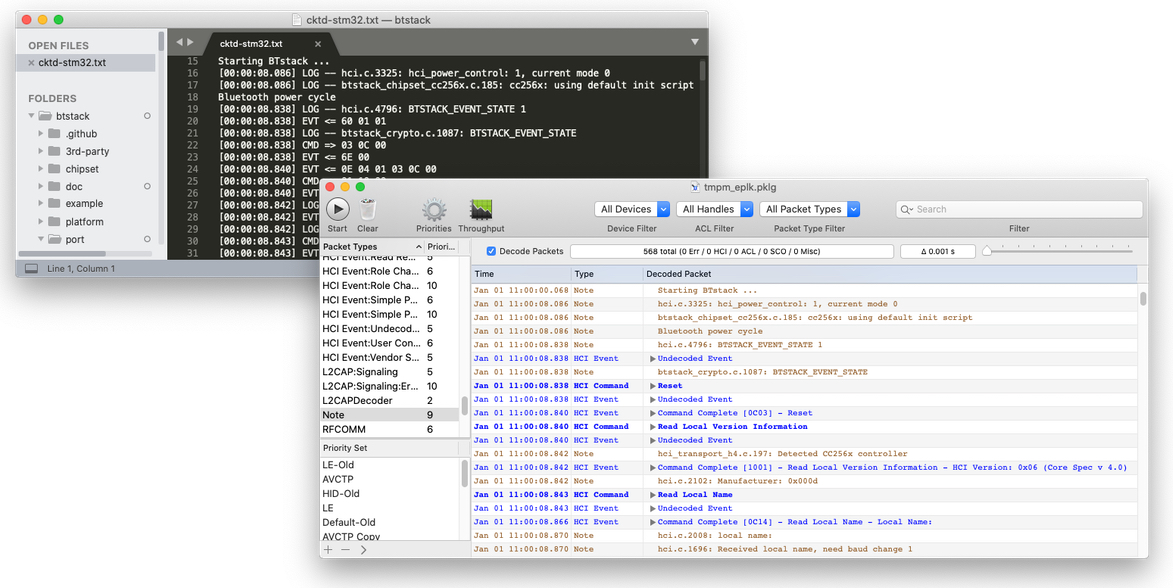
BTstack can output application logs inlined with HCI traffic. We internally just call it HCI dump, and use this feature on a daily basis, whether we are just developing BTstack or need to analyze a reported issue.
BTstack’s HCI Dump functionality is quite flexible and can also be used on an embedded target with just a regular UART debug output or the faster SEGGER RTT.
The usual HCI dump form that we encounter with an issue report, a user email, or our own embedded development with SEGGER Ozone is text output. The text output can be stored and converted into a PacketLogger file (.pklg) for further analysis in Wireshark or Apple’s PacketLogger tool.

For quite some time, I’ve envied people that made their own PCB boards to solve simple connectivity problems instead of using solderless breadboards or creating some ugly and non-robust one-off solder sins. While a decade ago, creating PCB was either expensive or involved toxic chemicals for the DIY path, companies like Oshpark, Fritzing Fab, or SeeedStudio Fusion solve this problem by providing small PCB for a few bucks.
Now, we just need to design the board. Recently, I needed a simple board to break out all lines of a 0.05″ DIP module. With help of a friend, it didn’t take long to add two 0.05″ and two 0.1″ connectors, connect them one by one, plus route all connections manually for fun in KiCad.
When a Bluetooth use case doesn’t work as expected, it’s often very helpful to analyze the Bluetooth communication.
If one side is using BTstack, a good way for this is to just enable HCI Packet Log, convert the console output with the create_packet_log.py tool and then inspect it with Apple’s PacketLogger (macOS only) or Wireshark (any platform). By this, the debug output is captured in-line with the Bluetooth packets, which makes them much easier to analyze.
